Swiggy: Food Instamart Dineout
- 4.7
- Rating
- 100.00M
- Installs
- Free
- Price

 Analysis by App-foxy
If you are trying Swiggy for the first time, the easiest way to understand it is as a food-and-shopping app built around several everyday decisions: what to eat now, what to pick up for home, or where to dine out. I found the experience most useful when I treated it less like a catalogue to browse endlessly and more like a quick decision tool. The app is free, developed by Swiggy, and available to Everyone, so it is approachable for a household with different kinds of users.
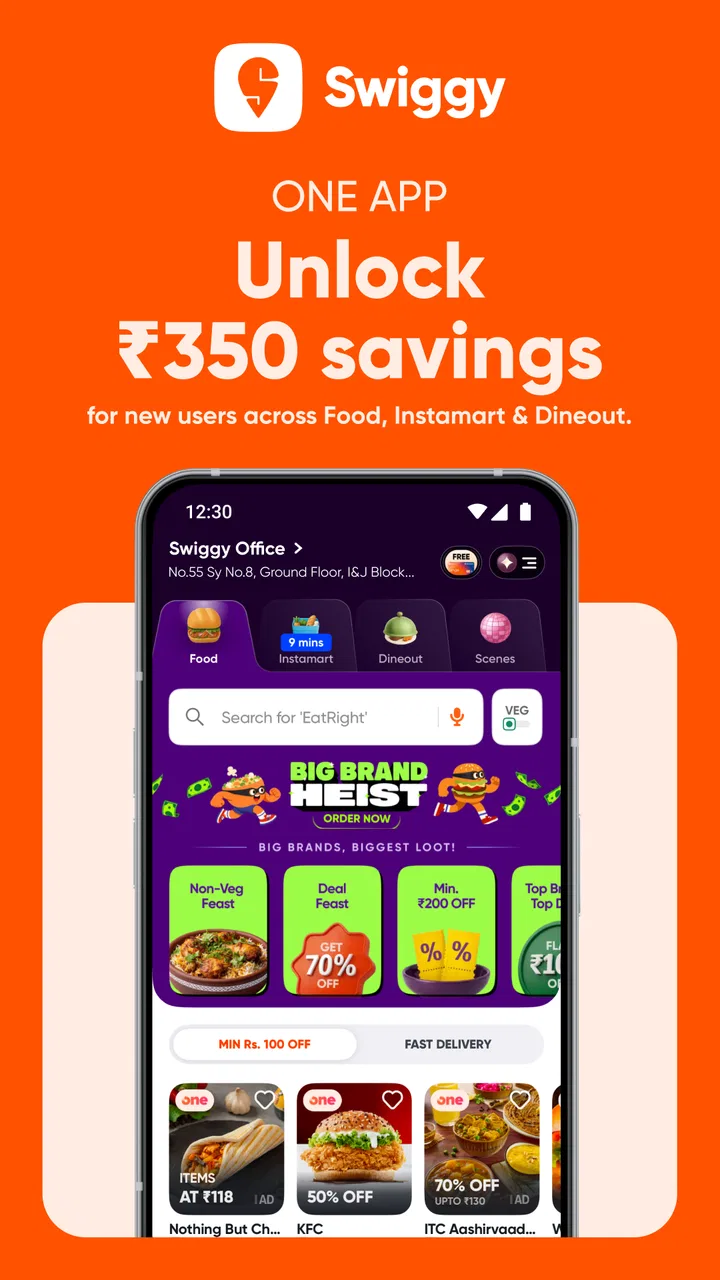
Its Food & Drink category covers online food delivery, grocery shopping through Instamart, and restaurant offers through Dineout. That combination is the main reason to install it instead of keeping separate apps for each task. It can be especially convenient when I am already planning dinner and suddenly remember that I also need a few household items. At the same time, putting several services together means the opening screen can feel busy until I learn where each option lives.
What to expect before placing your first order
The first thing I noticed is that Swiggy is designed around location. The choices shown to me depend on the delivery address or area I select, so the app makes much more sense after I set a realistic location rather than casually browsing from somewhere else. Restaurants, grocery availability, delivery estimates, and Dineout offers are all practical only when they match the place where I actually intend to use them.
You May Also Like

 AccuWeather: Weather Radar
AccuWeather Review: A Quick, Clear Forecast for Everyday Decisions
For everyday plans, the best forecast is the one you can understand quickly. AccuWeather makes rain timing, radar, and local conditions easy to act on, with a few trade-offs.

 Hill Climb Racing
Why Hill Climb Racing Still Turns Crashes Into One More Run
A tiny car, a bumpy hill and one more upgrade: Hill Climb Racing keeps resurfacing because its simple chaos makes every near-miss feel personal.

 AliExpress - Shopping App
AliExpress Makes Global Shopping Feel Personal, but Shoppers Bear the Risk
AliExpress turns a global marketplace into a pocket-sized discovery engine. Its reach is useful, its shopping loop compelling, and its trade-offs easy to miss.

 Lords Mobile: Kingdom Wars
Lords Mobile Is a Kingdom-Building Routine, Not a Quick Match
A case-by-case verdict on the building, battles, device demands, and social commitments that make Lords Mobile rewarding for some players and exhausting for others.

 PDF Scanner app - TapScanner
TapScanner Makes Paperwork Easier to Capture, Check, and Share
TapScanner makes scanning with a phone feel less like a rescue operation and more like a dependable step in getting work done. Its capture tools are useful, though not flawless.

 Block Blast!
Block Blast! Shows How Much a Puzzle Game Can Leave Out
A quiet grid game shows why puzzle players increasingly value instant clarity, repeatable skill and low-pressure play—and where the genre still needs to catch up.
More From Our News Desk
View All News


The app has a strong reputation, with a 4.7 average from around 13 million ratings and over 100 million installs. Those figures suggest that it has become a familiar option for many people, but they should not replace checking the details of a particular restaurant or item. My experience with a delivery app can change depending on distance, demand, the restaurant’s preparation time, and what is available in my area.
The three main uses feel different. Food delivery is for choosing a meal from a restaurant and arranging delivery. Instamart is better suited to quick grocery needs, such as ingredients, snacks, or household basics. Dineout is aimed at restaurant visits and deals rather than bringing food to my door. I recommend deciding which of these jobs I am doing before I start browsing, because switching between them without a plan can make the app feel more complicated than it needs to be.
My first-user advice is simple: set the address first, then choose the service. This prevents a common mistake in which someone spends time comparing restaurants or products that are not relevant to the final location. It also gives the app a better chance of showing useful availability instead of a broad, generic selection.
Setting up an account without overthinking it
After installing the app, I would begin by entering the delivery location I use most often. If I am setting it up while away from home, I would add the actual home or office address rather than assuming the current position is correct. That small choice matters because a restaurant that looks convenient from one place may not serve another, and grocery choices can vary just as much.
The app is currently listed as version 4.109.1 and requires Android 7.0 or later. On a compatible device, the basic setup should be familiar: open the app, identify the location, and then explore the food, grocery, or dining section that matches the immediate need. I would not spend time exploring every category during setup. The fastest route to understanding the service is to complete one small task.
For a first order, I prefer choosing something uncomplicated from a restaurant I already recognize. That lets me judge the ordering flow without also wondering whether an unfamiliar menu will suit me. For Instamart, a short list of everyday items is a better test than a large weekly shop. For Dineout, I would first inspect a nearby restaurant and read the offer conditions carefully before making plans around it.
One useful habit is to review the final order screen slowly. I check the delivery address, selected items, quantities, and any visible charges before confirming. This is more valuable than rushing because the biggest avoidable problems in shopping apps usually come from an old address, an accidental quantity, or misunderstanding whether I am ordering delivery or planning a dine-in visit.
Reaching a meaningful first success
The best first success is not simply opening a menu; it is completing a small, realistic action. If I am hungry, I search for a familiar meal, compare a few nearby choices, and place an order only after checking the basket. If I need groceries, I make a focused Instamart list instead of scrolling through every aisle. If I am meeting someone, I use Dineout to investigate a suitable restaurant and its available deal before leaving home.
For food delivery, I find that browsing by craving is often quicker than browsing by restaurant name. I might begin with a meal type, then narrow the list by distance, cuisine, or personal preference. The important trade-off is that the cheapest-looking choice is not automatically the best value once delivery details, portions, and convenience are considered. I would compare the complete basket, not just the headline item.
A realistic evening example would be arriving home late with no ingredients. I can open the food section for a ready-made dinner, but I might switch to Instamart if I would rather prepare something simple. The combined service is useful here because I can make that decision in one place. If I am meeting friends the next day, Dineout provides a separate path for checking restaurants and offers instead of treating every need as delivery.
Instamart is most convincing when I need a few things quickly rather than when I want to plan a detailed grocery budget. I would use it for forgotten breakfast items, snacks for guests, or a last-minute cooking ingredient. A practical tip is to search for the exact item first, then inspect related suggestions only after confirming that the main item is available. This keeps the basket focused and reduces impulse additions.
Dineout requires a different mindset. I would not assume that finding a deal means the entire visit is automatically discounted. I read the offer’s conditions, check whether the restaurant suits the occasion, and confirm the details inside the app before relying on it. This is one of the most important distinctions for new users: Dineout helps with restaurant discovery and deals, while food delivery helps with ordering a meal to a chosen address.
Small habits that make the app easier to use
One of the less obvious advantages of having food, groceries, and dining in the same app is context switching. If a restaurant meal is taking longer than I want, I can reconsider whether a quick grocery order would solve the evening more practically. That does not mean every option will be available or equally suitable, but the comparison is faster than starting from separate services.
I also recommend keeping the first basket deliberately small. A short order makes it easier to spot substitutions, quantities, and address mistakes. Once I understand how the app presents the final review screen, I can use it for larger grocery lists or more complicated meal orders with less uncertainty. This is a better learning strategy than placing a large first order and trying to diagnose several issues at once.
Another useful workflow is to separate discovery from commitment. I can browse restaurants or products while deciding, but I wait until I know the address and the purpose of the order before filling the basket. This matters because the app combines several kinds of shopping, and a little browsing can quickly become a mixed basket of food, groceries, and dining ideas that I do not actually need.
When comparing alternatives, Swiggy’s main strength is convenience across these connected use cases. A dedicated food-delivery app may feel simpler if I only ever order restaurant meals. A specialist grocery service may be preferable if I want a highly focused supermarket experience. A restaurant-discovery service may be better for someone who cares only about dining out. I see Swiggy as the stronger choice for people who value having these decisions together, not necessarily for users who want the narrowest possible interface.
Where first-time users may hesitate
The biggest source of confusion is the difference between delivery and dining. A Dineout listing is not the same thing as a delivered meal, and a grocery result is not necessarily a substitute for a restaurant order. I would always look at the section label and the action the screen is asking me to take. If I want food delivered, I stay in the food area; if I want to visit a restaurant, I investigate Dineout instead.
Another point of friction is availability. A restaurant or grocery item can look appealing while browsing, but the final usefulness depends on the selected address and current service conditions. I avoid building my entire plan around one item until I have checked that it can actually be added and delivered to the intended place. For an important meal, I keep a second choice in mind rather than waiting until the last step to reconsider.
Users may also wonder whether the app is suitable for a large household. It can handle the convenience of combining different needs, but I would still review quantities carefully. Instamart is excellent for quick top-ups, while a traditional supermarket trip or a specialist grocery service may be a better fit for a planned, extensive shop. The right choice depends on whether speed or detailed control matters more for that particular purchase.
Privacy and notification comfort are also worth considering in everyday use. I prefer allowing only the access needed for the task I am performing and adjusting alerts if the app becomes too chatty. I do not need constant prompts to benefit from food delivery or grocery ordering. A calmer notification setup makes the service feel like a tool I open when needed rather than another source of interruptions.
There is also a practical limitation in relying on a single app for several services: the interface can feel crowded. Someone who knows exactly which restaurant they want may reach the result quickly, but a first-time user who explores every section can lose focus. My solution is to use one service at a time and search with a concrete goal, such as “dinner for two,” “breakfast items,” or “restaurant for tonight.”
Swiggy is not the right choice for everyone. I would skip it if I strongly prefer shopping directly with local stores, if I want to avoid app-based delivery entirely, or if the relevant restaurants and grocery options in my area are limited. I would also choose a dedicated alternative when I need a very specialized grocery catalogue or a restaurant tool with a narrower focus. The convenience of one app is valuable, but it should not outweigh local availability or personal preferences.
How the service fits different routines
For a busy professional, the app can reduce the number of decisions between work and dinner. A student may appreciate the ability to order a meal or a few essentials without planning a full shopping trip. Families can use the separate sections for different moments of the week, while occasional users may simply install it for a particular restaurant or grocery need. The strongest match is someone who values flexibility more than a minimalist interface.
For Dineout, I see the greatest benefit in planning rather than improvising. Before meeting friends, I can inspect nearby possibilities and consider whether an available offer fits the occasion. I still make the final decision based on the restaurant itself, location, and the terms shown in the app. Treating the deal as one factor instead of the whole reason to choose a venue leads to more sensible results.
For Instamart, the app works best as a gap-filler in my routine. I use it when one missing ingredient would otherwise delay a meal, or when I need a few convenient items without making a separate trip. I would not automatically use it for every grocery purchase, especially when I want to compare brands carefully or plan a large shop. That distinction helps control both time and unnecessary spending.
The app is free to install, and its Everyone age rating makes it broadly accessible. That does not mean every order will suit every budget or situation. I still compare the complete basket and think about whether delivery convenience is worth the total cost for that occasion. The free app is an invitation to use the service, not a reason to stop evaluating each purchase.
My recommendation after using all three areas
After trying the different purposes, I would recommend Swiggy to a first-time user who wants one familiar place for restaurant delivery, quick groceries, and dining-out discovery. The path to a good first experience is straightforward: set the correct address, choose one service, make a small order or focused search, and inspect the final details before committing.
The rating of 4.7 and the scale of more than 100 million installs show why the app is widely noticed, but my recommendation is based more on how its parts fit together. I like being able to move from a dinner decision to a grocery solution without changing apps. I also appreciate that Dineout serves a different purpose instead of forcing restaurant visits into the same delivery workflow.
My reservations are equally clear. The combined design can require a little patience, availability depends heavily on location and timing, and a specialist service may be more efficient for a narrowly defined task. I would not install it expecting every local option or every grocery need to be handled identically. I would install it because it gives me several useful routes when my plans change.
In practical terms, I would begin with a familiar restaurant meal or a short Instamart basket, then try Dineout separately when I am planning an outing. That sequence teaches the app without making the first experience overwhelming. Once the workflow feels natural, the real benefit appears: Swiggy becomes most useful when it helps me choose the right kind of convenience, not merely when it delivers something quickly.
FAQs for Swiggy: Food Instamart Dineout
01What is Swiggy: Food Instamart Dineout, and how does it work?
Swiggy: Food Instamart Dineout is a comprehensive app that integrates food delivery, grocery shopping, and dining out services. Users can order meals from local restaurants, shop for groceries through Instamart, or reserve tables at nearby dining establishments. The app provides a seamless experience by offering various services in one platform, making it convenient for users to manage their daily needs.
02Is Swiggy available in my city or region?
Swiggy operates in numerous cities across India, and its availability depends on your location. The app continuously expands its service areas, so it’s best to check the app or website for the latest coverage updates. By entering your address, Swiggy will inform you if their services are accessible in your area.
03What are the payment options available on Swiggy?
Swiggy supports a wide range of payment options to ensure convenience and flexibility. Users can pay using credit or debit cards, net banking, UPI, and popular digital wallets. The app also offers cash on delivery in certain areas, providing an additional payment method for those who prefer it.
04How does Swiggy ensure food and grocery quality?
Swiggy collaborates with trusted restaurants and grocery partners to ensure high-quality products. The app features user reviews and ratings to help you make informed decisions. Additionally, Swiggy has quality checks and offers customer support to address any issues related to food or grocery quality, ensuring a satisfying experience.
05Does Swiggy offer any discounts or promotional offers?
Swiggy frequently provides discounts and promotional offers to enhance user experience. These may include percentage-based discounts, free delivery, or special deals on certain restaurants and grocery items. Users can find these offers within the app or receive notifications, ensuring they never miss a chance to save on their orders.
Pros
- Wide variety of food options.
- User-friendly interface.
- Fast delivery times.
- Multiple payment options.
- Exclusive discounts available.
Cons
- Limited in smaller cities.
- Occasional app glitches.
- High delivery charges at times.
- Limited customer support hours.
- Inconsistent restaurant ratings.

Swiggy: Food Instamart Dineout
Gallery